
This post may contain affiliate links. Please read our disclosure policy.
Are you calculating your recipe’s SmartPoints right? It’s trickier than it used to be with PointsPlus…
I received this email the other day…
Hi Martha,
I signed up and received your free, downloadable cookbook…being a Weight Watcher myself as well as a meeting room leader I decided to use the hand held Weight Watcher calculator we sell in the meeting room to ‘recalculate’ the Smart Points on all of the recipes. Several of the recipes came up with higher points and one of them came down a point. I thought you would want to know this.
Thanks for your time…
How Is Weight Watchers Different For 2018?
Here’s how I responded…
It’s important to keep in mind that zero point fruits and vegetables are NOT included when determining a recipe’s SmartPoints® value, which is different than it was with PointsPlus® (Blended beverages are the exception.)
(This is all explained in the Weight Watchers Beyond the Scale Program Guide.)
This explains the disparity you are seeing when you use the WW calculator. The nutritional information (calories, fat, carbs, etc.,) in my recipes is for ALL the ingredients, including the fruits and vegetables. This is necessary for accuracy for folks not on Weight Watchers, who might be counting calories, carbs, etc.
I calculate the SmartPoints® value with the Weight Watchers Recipe builder, which adjusts for fruits and vegetables and other zero points foods. So, if the number differs from the value we provide that’s why.
Remember: The SmartPoints® calculator won’t always give you accurate results for recipes. So if the number differs from the value we provide, trust the SmartPoints® value we provide.
Which got me thinking, there may be lots of Weight Watchers members, new and experienced that may not be calculating their SmartPoints right if they are using nutritional information from recipes they find on the internet or in cookbooks! So, I decided to write about it in the hopes of clearing up the confusion.
Are You Calculating Weight Watchers SmartPoints Correctly?
4/17 Update: Why Recipe SmartPoints® Don’t Always Match Up with the Weight Watchers Calculator
The SmartPoints® calculator won’t work with recipes. It’s only meant for individual foods. To get the value for something like an english muffin, you’d enter the calories, saturated fat, sugar, and protein into the calculator.
But calculating SmartPoints for recipes is different.
The SmartPoints® value of a recipe is determined by adding up the values of the individual ingredients. This makes sense, because most fruits and vegetables have a value of zero and remain zero in recipes.
For example, let’s say a recipe consists of 2 large eggs, 1 cup sliced onions and peppers, and 3 tablespoons shredded part-skim mozzarella. To get the SmartPoints® value of the recipe, you’d simply add up the values of each ingredient: *4 for the eggs, *0 for the onions and peppers, and *2 for the cheese, giving you a total SmartPoints® value of *6. For a two-serving recipe, you’d just divide the value in half, rounding the value as needed.
There’s just one exception. Zero-point fruits and vegetables DO contribute points to a recipe when they’re liquefied and part of a beverage. When you use the Weight Watchers Recipe Builder, clicking the “This Is a Drink” box will automatically apply values to fruits and veggies based on their calories, saturated fat, etc. That’s because research shows that fruits and vegetables are more satisfying and keep you feeling full longer when they’re chewed as opposed to sipped.
If you want to calculate a recipe yourself, just go to the Recipe Builder on the Weight Watchers website. (Log in, click “Create,” and select “Recipe.”)
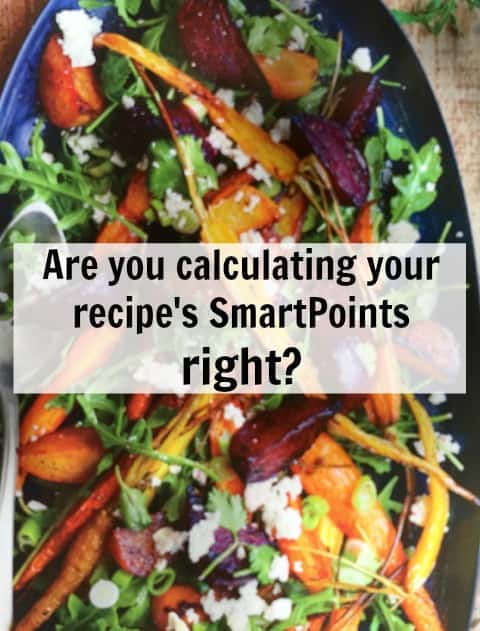
I think it’s great that fruits and vegetables are NOT included in the The SmartPoints® calculation for recipes like they were with PointsPlus®. Fruits and vegetables are good for us and we don’t eat nearly enough of them so anything Weight Watchers can do to encourage us to eat more of them is a very GOOD thing.
But, I’m concerned that not understanding how the The SmartPoints® calculation works and how this can effect using the WW calculator to determine SmartPoints® from a recipe or nutritional will result in people thinking that recipes with fruits and vegetables have way more The SmartPoints® than they do!
Here’s an example from the new Weight Watchers Year Round Fresh Cookbook of Why You Can’t Use The Calculator to Accurately Determine the SmartPoints®
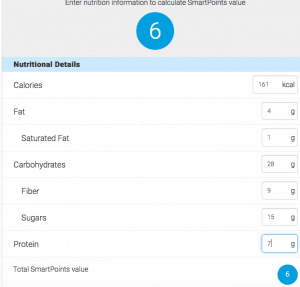
On page 130, there’s a recipe for a Roasted Beet and Carrot Salad that looks delicious. When I enter the nutritional information into the Weight Watchers calculator I get a SmartPoints® value of 6. But the book tells me that The SmartPoints® value is 2!
Why? Because many of the calories, carbs, sugars in this recipe come from 0 Points fruits and vegetables!
Roasted Beet and Carrot Salad
Servings: 4
Ingredients:
1 pound baby carrots
2 teaspoons olive oil
1 pound beets
1/2 teaspoon grated lime zest
2 tablespoons lime juice
1 tablespoon red wine vinegar
1 teaspoon honey
1/2 teaspoon salt
1/4 cup chopped fresh cilantro
2 scallions
4 cups baby arugula or salad greens
1/4 cup crumbled reduced-fat feta cheese
Nutritional Information Per Serving (1 cup beet and carrot salad, 1 cup greens and 1 tablespoon cheese): 161 calories, 4 g fat, 1 g sat fat, 55 mg sodium, 28 g total carb, 15 g sugar, 9 g fiber, 7 g protein
SmartPoints® Value: 2 (using WW Recipe Builder)
SmartPoints®: 6 (using WW Calculator and the recipe’s nutritional information)
This is fine with a Weight Watchers cookbook (affiliate link), which has the SmartPoints® clearly displayed. As a Weight Watcher I’m going to go with the value displayed: 2SP and not even think about calculating the value myself. But, what if I’m using the nutritional information for a recipe from a non-Weight Watchers cookbook (affiliate link) or some other source?
Remember, you can’t accurately determine a recipe’s SmartPoints® with the Weight Watchers Calculator!
In this example it’s 4 SP higher, which is significant.
What can you do?
- Use the WW Recipe Builder.
- Choose a similar recipe from the Weight Watchers app/tracker and call it close enough.
- Guesstimate by adding up and tracking the ingredients that DO Have SmartPoints in a serving. In this example, the 1 tablespoon feta cheese (1SP), 1/2 teaspoon oil (1SP). (1/4th of the ingredients for a serving.)
Does this make sense? Do you have other ideas about calculating SmartPoints® for your favorite recipes?
WW New Program Overview – Beyond The Scale
P.S. Here’s an explanation from Hungry Girl…
Dear Hungry Girl,
I LOVE that you’re listing Weight Watchers SmartPoints® values with your new recipes! However, sometimes when I plug the recipe stats into the WW calculator, I get different values than what you list. Why is that? How do I calculate the values for recipes that don’t list saturated fat or sugar, etc.?
Puzzled by SmartPoints™

Hi Puzzled,
I’ve gotten questions like this A LOT! First things first: We take pride in providing only the most accurate nutritional info, and that includes SmartPoints® values. I promise you, the values you see with our recipes are 100 percent correct. Here’s the full 411 on all your questions…
Recipe values won’t always match up with the SmartPoints® calculator, but that doesn’t mean they’re not correct. Just like Weight Watchers, we don’t count the calories, sugar, etc., from most fruits and veggies when calculating recipe values. (Blended beverages are the exception.) That’s because most fruits and veggies have a SmartPoints® value of 0. Yes, this process is different than it was with PointsPlus®. We’re guessing that’s because sugar content has such an impact on SmartPoints® values, and fruits and veggies contain natural sugars (which are not discouraged on the plan). It makes sense, if you think about it. Adding 0-point berries to your oatmeal bowl shouldn’t cause the value to increase, whether it’s a “recipe” or not!
Bottom line: The SmartPoints™ calculator won’t always give you accurate results for recipes. So if the number differs from the value we provide, trust us: Our value is correct.
So how can you calculate the SmartPoints® value of a recipe that doesn’t already list a value? Add the ingredients to the recipe builder on the Weight Watchers website. (Click on “Create” and select “Recipe.”) If you don’t see the exact food you’re looking for, pick the closest match. Remember, even if a recipe lists saturated fat, this method is more accurate than putting the total nutritional info into the SmartPoints® calculator (which would automatically count the nutrients from fruits and veggies).




Thank you for this, interesting, and it makes sense! Huh, I wonder if this is why I have been getting different point values when “scanning” vs. using calculator. One of the items in question is a marinara sauce. Much higher when calculated than scanned. I’ve been discouraged in scanning because of this, and always double checking and going with the calculated total. Thoughts?
Hi Ilka, my thought is that the scanned value would be the correct one since WW would be adjusting for the zero points fruits and vegetables, but this is just a guess. Hope this helps.
I really appreciate this site, very valuable info, just stopping in to say thank you! JB
Hi Jackie, Thanks so much for stopping by and leaving such a kind comment. I really appreciate it!!
*weight
Thanks Martha! I find your posts very helpful and your recipes yummy! I am a lifetime who needed to get a big of eight off and rejoined 5 weeks ago. Loving the SP and appreciate your help! ?
Hi Debbie, Thanks for your kind comments 🙂
I don’t have the e-tools for WW so I can’t use the recipe builder. When trying to determine SP value for a recipe I make, I figure the total points for each individual component, add it all up, and divide by the number of servings. Using this method, my fruits and veggies are always 0 (aside from those that are points, obviously). I think it’s been working well so far!!!
Hi Erin, love this idea for accurately counting SmartPoints without the recipe builder! Thanks for taking the time to share with us!!
The only way I could think of calculating is to look up the values for the fruits and veggies and back them out of the nutrition totals to get the information to calculate SPs.
Thanks Sandee. Erin shared a great approach too: I figure the total points for each individual component, add it all up, and divide by the number of servings. Using this method, my fruits and veggies are always 0 (aside from those that are points, obviously). I think it’s been working well so far!!!
Martha. You are very wise about smart points. Definitely right on! I too use recipe builder rather than nutritional values for recipes. Will definitely use you recipes with confidence. Thank you!
Hi Donna! Thanks for your kind comment!! I really appreciate it 🙂
This makes soo much sense but is very frustrating that you can’t easily get the SP value off of a recipe’s nutritional info. Will you be calculating differently going forward? It would be so helpful to have the more accurate numbers on the website!
Hi Rachel, ever since SmartPoints was introduced I’ve been using the WW Recipe Builder to accurately calculate SmartPoints for new recipes. I’m also trying to work my way back through old favorite recipes to recalculate the.
Thanks for this post. I recently joined WW after a long break (2006) so trying to get a handle on the new system. A meeting leader said that fruits and vegetables have points if you drink them. Do you know if this is correct? I like to eat plain, nonfat Greek yogurt with fruit but sometimes I will pop it into the blender with some spinach for an on the go breakfast. Would those same fruits and vegetables now have points? Thanks!
Hi Dana, yes according to the WW Recipe Builder/Calculator whenever you blend your fruits and veggies and then drink them you are to count the points. But everyone does this differently. I think the logic is that it’s much easier to go overboard with fruits that you drink rather than eat. WW found that folks were overeating blended fruit and sabotaging their weight loss goals. Hope this helps.
Martha,
RE: Blended Foods … not much for breakfast.
If I am just making a smoothie for that meal & not going crazy on blending fruits all day
do you think I am “safe’ not counting those fruit/veg points? Otherwise I am not eating
breakfast…
Thanks, found lots of helpful items on your web site. New to WW but not new enough. Just got a handle on pp then the switcheroo … good in the long run, just hard to change AGAIN so soon …
Hi Grace, Thanks for your kind comment. The WW wisdom is to let your weight loss be your guide. If your total daily fruit intake is not more than 2-3 servings of fruit you should be find not counting those smoothie points. I begin counting when my fruit servings go beyond 3 in a day. Hope this helps.
Thank you!
Thanks so much for clearing that up! I’ll go back and re-calculate my favorite old recipes with Recipe builder. It takes some time to do, but if I can save some points, it’ll be worth it! I tried your Chicken salad with Apples and Cranberries the other day…delish! Thanks, Sandy
Hi Sandy, Thanks for your kind comment. I really appreciate it. I think you may be pleasantly surprised when you run your favorite recipes through the recipe builder, especially those with lots of fruit and veggies.
Hey Martha … I just rejoined WW again going to give this smart points thing another shot. So my question is why is a lunch of 1-4 c. tuna T. of low fat Mayo 2 whole wheat crackers and a med . apple 3 points till you save it as a meal , then the apple counts as 5 points ? Won’t be saving any meals I can tell you that !
LOL Love your sight so far . Just found it last night . Thanks for the motivation to try it again.
Hi Victoria, Thanks for your comment! Congrats on rejoining WW!! I think the key is to stick with and figure out how to adapt WW to fit your needs. That is what I’ve done through the years. It’s a great program and provides the flexibility to help everyone succeed! Just don’t get too hung up on the Points, lol!!
I joined the WW online but how do I figure how many points I get a day can someone help all I know it has something to do with weight or maybe you can tell me where to find. Thanks!!
Hi Patsy,
When you sign in online, the site should take you through the process of answering the questions
needed to determine your daily SP allowance. It should then be displayed on your dashboard. If
you are having trouble I would contact WW and ask for assistance. Hope this helps.