
This post may contain affiliate links. Please read our disclosure policy.
Are you calculating your recipe’s SmartPoints right? It’s trickier than it used to be with PointsPlus…
I received this email the other day…
Hi Martha,
I signed up and received your free, downloadable cookbook…being a Weight Watcher myself as well as a meeting room leader I decided to use the hand held Weight Watcher calculator we sell in the meeting room to ‘recalculate’ the Smart Points on all of the recipes. Several of the recipes came up with higher points and one of them came down a point. I thought you would want to know this.
Thanks for your time…
How Is Weight Watchers Different For 2018?
Here’s how I responded…
It’s important to keep in mind that zero point fruits and vegetables are NOT included when determining a recipe’s SmartPoints® value, which is different than it was with PointsPlus® (Blended beverages are the exception.)
(This is all explained in the Weight Watchers Beyond the Scale Program Guide.)
This explains the disparity you are seeing when you use the WW calculator. The nutritional information (calories, fat, carbs, etc.,) in my recipes is for ALL the ingredients, including the fruits and vegetables. This is necessary for accuracy for folks not on Weight Watchers, who might be counting calories, carbs, etc.
I calculate the SmartPoints® value with the Weight Watchers Recipe builder, which adjusts for fruits and vegetables and other zero points foods. So, if the number differs from the value we provide that’s why.
Remember: The SmartPoints® calculator won’t always give you accurate results for recipes. So if the number differs from the value we provide, trust the SmartPoints® value we provide.
Which got me thinking, there may be lots of Weight Watchers members, new and experienced that may not be calculating their SmartPoints right if they are using nutritional information from recipes they find on the internet or in cookbooks! So, I decided to write about it in the hopes of clearing up the confusion.
Are You Calculating Weight Watchers SmartPoints Correctly?
4/17 Update: Why Recipe SmartPoints® Don’t Always Match Up with the Weight Watchers Calculator
The SmartPoints® calculator won’t work with recipes. It’s only meant for individual foods. To get the value for something like an english muffin, you’d enter the calories, saturated fat, sugar, and protein into the calculator.
But calculating SmartPoints for recipes is different.
The SmartPoints® value of a recipe is determined by adding up the values of the individual ingredients. This makes sense, because most fruits and vegetables have a value of zero and remain zero in recipes.
For example, let’s say a recipe consists of 2 large eggs, 1 cup sliced onions and peppers, and 3 tablespoons shredded part-skim mozzarella. To get the SmartPoints® value of the recipe, you’d simply add up the values of each ingredient: *4 for the eggs, *0 for the onions and peppers, and *2 for the cheese, giving you a total SmartPoints® value of *6. For a two-serving recipe, you’d just divide the value in half, rounding the value as needed.
There’s just one exception. Zero-point fruits and vegetables DO contribute points to a recipe when they’re liquefied and part of a beverage. When you use the Weight Watchers Recipe Builder, clicking the “This Is a Drink” box will automatically apply values to fruits and veggies based on their calories, saturated fat, etc. That’s because research shows that fruits and vegetables are more satisfying and keep you feeling full longer when they’re chewed as opposed to sipped.
If you want to calculate a recipe yourself, just go to the Recipe Builder on the Weight Watchers website. (Log in, click “Create,” and select “Recipe.”)
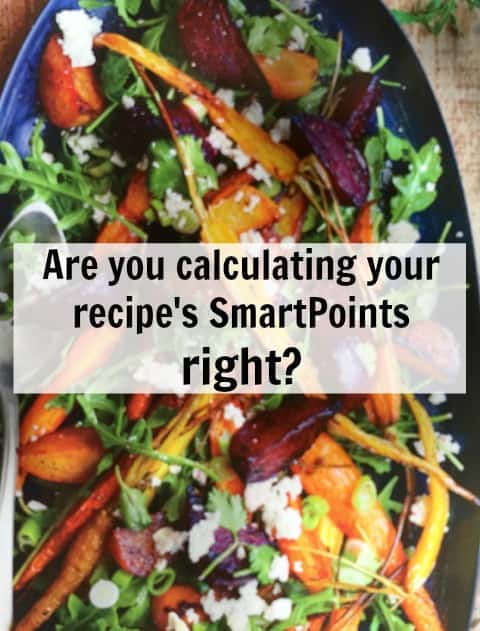
I think it’s great that fruits and vegetables are NOT included in the The SmartPoints® calculation for recipes like they were with PointsPlus®. Fruits and vegetables are good for us and we don’t eat nearly enough of them so anything Weight Watchers can do to encourage us to eat more of them is a very GOOD thing.
But, I’m concerned that not understanding how the The SmartPoints® calculation works and how this can effect using the WW calculator to determine SmartPoints® from a recipe or nutritional will result in people thinking that recipes with fruits and vegetables have way more The SmartPoints® than they do!
Here’s an example from the new Weight Watchers Year Round Fresh Cookbook of Why You Can’t Use The Calculator to Accurately Determine the SmartPoints®
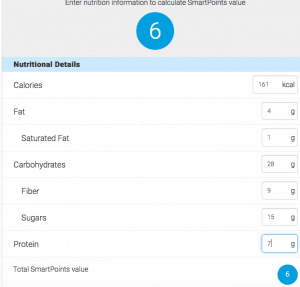
On page 130, there’s a recipe for a Roasted Beet and Carrot Salad that looks delicious. When I enter the nutritional information into the Weight Watchers calculator I get a SmartPoints® value of 6. But the book tells me that The SmartPoints® value is 2!
Why? Because many of the calories, carbs, sugars in this recipe come from 0 Points fruits and vegetables!
Roasted Beet and Carrot Salad
Servings: 4
Ingredients:
1 pound baby carrots
2 teaspoons olive oil
1 pound beets
1/2 teaspoon grated lime zest
2 tablespoons lime juice
1 tablespoon red wine vinegar
1 teaspoon honey
1/2 teaspoon salt
1/4 cup chopped fresh cilantro
2 scallions
4 cups baby arugula or salad greens
1/4 cup crumbled reduced-fat feta cheese
Nutritional Information Per Serving (1 cup beet and carrot salad, 1 cup greens and 1 tablespoon cheese): 161 calories, 4 g fat, 1 g sat fat, 55 mg sodium, 28 g total carb, 15 g sugar, 9 g fiber, 7 g protein
SmartPoints® Value: 2 (using WW Recipe Builder)
SmartPoints®: 6 (using WW Calculator and the recipe’s nutritional information)
This is fine with a Weight Watchers cookbook (affiliate link), which has the SmartPoints® clearly displayed. As a Weight Watcher I’m going to go with the value displayed: 2SP and not even think about calculating the value myself. But, what if I’m using the nutritional information for a recipe from a non-Weight Watchers cookbook (affiliate link) or some other source?
Remember, you can’t accurately determine a recipe’s SmartPoints® with the Weight Watchers Calculator!
In this example it’s 4 SP higher, which is significant.
What can you do?
- Use the WW Recipe Builder.
- Choose a similar recipe from the Weight Watchers app/tracker and call it close enough.
- Guesstimate by adding up and tracking the ingredients that DO Have SmartPoints in a serving. In this example, the 1 tablespoon feta cheese (1SP), 1/2 teaspoon oil (1SP). (1/4th of the ingredients for a serving.)
Does this make sense? Do you have other ideas about calculating SmartPoints® for your favorite recipes?
WW New Program Overview – Beyond The Scale
P.S. Here’s an explanation from Hungry Girl…
Dear Hungry Girl,
I LOVE that you’re listing Weight Watchers SmartPoints® values with your new recipes! However, sometimes when I plug the recipe stats into the WW calculator, I get different values than what you list. Why is that? How do I calculate the values for recipes that don’t list saturated fat or sugar, etc.?
Puzzled by SmartPoints™

Hi Puzzled,
I’ve gotten questions like this A LOT! First things first: We take pride in providing only the most accurate nutritional info, and that includes SmartPoints® values. I promise you, the values you see with our recipes are 100 percent correct. Here’s the full 411 on all your questions…
Recipe values won’t always match up with the SmartPoints® calculator, but that doesn’t mean they’re not correct. Just like Weight Watchers, we don’t count the calories, sugar, etc., from most fruits and veggies when calculating recipe values. (Blended beverages are the exception.) That’s because most fruits and veggies have a SmartPoints® value of 0. Yes, this process is different than it was with PointsPlus®. We’re guessing that’s because sugar content has such an impact on SmartPoints® values, and fruits and veggies contain natural sugars (which are not discouraged on the plan). It makes sense, if you think about it. Adding 0-point berries to your oatmeal bowl shouldn’t cause the value to increase, whether it’s a “recipe” or not!
Bottom line: The SmartPoints™ calculator won’t always give you accurate results for recipes. So if the number differs from the value we provide, trust us: Our value is correct.
So how can you calculate the SmartPoints® value of a recipe that doesn’t already list a value? Add the ingredients to the recipe builder on the Weight Watchers website. (Click on “Create” and select “Recipe.”) If you don’t see the exact food you’re looking for, pick the closest match. Remember, even if a recipe lists saturated fat, this method is more accurate than putting the total nutritional info into the SmartPoints® calculator (which would automatically count the nutrients from fruits and veggies).




I just re-join WW I have been away for many years I purchased a program through QVC it came with a cookbook called my WW program cookbook the problem I’m having is how do I know the points for the single recipes or the ones for 2 to 4
Hi Martha! I found your site after searching for this very topic! I just rejoined WW after 5ish years away, and am getting acclimated to the new points system (on the purple plan). I was stressing out when I plugged in the nutritional info for the Hello Fresh meals I have left to cook this week and was almost in tears because on the purple plan my veggies + protein should be zeropoints! your article and video helped me SO MUCH!!! I’m going to utilize the recipe builder and other tips you suggested. Thanks again! Be well!
I am not sure how to access the recipe builder? I am a Wt Watcher member who attends weekly meetings. When I access Wt Watcher’s online site and go to Recipe Builder, all it provides is tips to use. There is no access. I am guessing you have to sign up for online as well? If that is the case, it is disappointing. You would think that Wt Watcher’s membership so to speak would grant access to something like this. Are they more about promoting good health or making money? Just a thought.
Thanks so much for clearing that up! I’ll go back and re-calculate my favorite old recipes with Recipe builder. It takes some time to do, but if I can save some points, it’ll be worth it! I tried your Chicken salad with Apples and Cranberries the other day…delish! Thanks, Sandy
I Wight 283 toal 7 points 1 two point 2 with mine whight coal mine name is ella may dilleard from falls pennsylvania Rd1 box 123 falls pa 18615 bithday 26 January 26th 1973
Hi – I have your skinny taste cookbook I just purchased recently. What I’ve been doing is using the WW calculator and entering the info off the nutritional label ? Are you saying that’s wrong? Or does this post only pertain to fruits and veggies ? Ex: what is the SP the eggplant dish and the broccoli and cheese ? Plan on making them this weekend.
Thank you
Hi Janet, Thanks for writing but the SkinnyTaste Cookbook isn’t mine. That was written by the talented Gina over at SkinnyTaste.com!! Unfortunately, because SmartPoints doesn’t include 0 points fruits and vegetables, you can’t really use the nutritional information from a recipe and the WW calculator to accurately calculate SmartPoints if the recipe has fruits and vegetables in it. If the recipe has no or very little fruits and vegetables than the SmartPoints value will be right or very close. Hope this helps!!
How do you access the recipe builder on the mobile site?I thought they didn’t have it available yet after the smart points. There’s a problem with the old WW cookbooks isn’t there.
Hi Wende, You can now access the recipe builder through the mobile app. You go to My Foods, then Recipes, then Create, then Create New Recipe! Hope this helps.